
When Users Receive An Email From Themselves... But They Didn’t Send It
How attackers abuse Microsoft 365 Direct Send to deliver phishing emails and steal credentials

“I Just Got a Weird Email From Myself. I Definitely Didn’t Send It. Am I Hacked?”
When you get this ticket from one of your users, you immediately assume compromise and jump into incident response mode.
You check the Entra sign-in logs: no suspicious login.
You check Message Trace: no weird sent emails.
So, what’s going on?
In most of these cases, the user isn’t compromised (yet), but they are being targeted by attackers.
That weird email from “themselves” is a phishing email from an attacker, designed to steal their credentials.
And the attacker is abusing Microsoft’s Direct Send functionality to slip past email filters and into the user’s inbox.
Let’s dive into a few cases to see what this looks like in practice.
Case 1: The Fake Fax Email Notification
Subject line:
New-Fax from HellmanCole received today, January 8, 2026 at 12:04:07 PM -refID: 5540768264|0f73e2202ee9efadd78c
Sender:
ckennedy@hellmancole.com
Recipient:
ckennedy@hellmancole.com
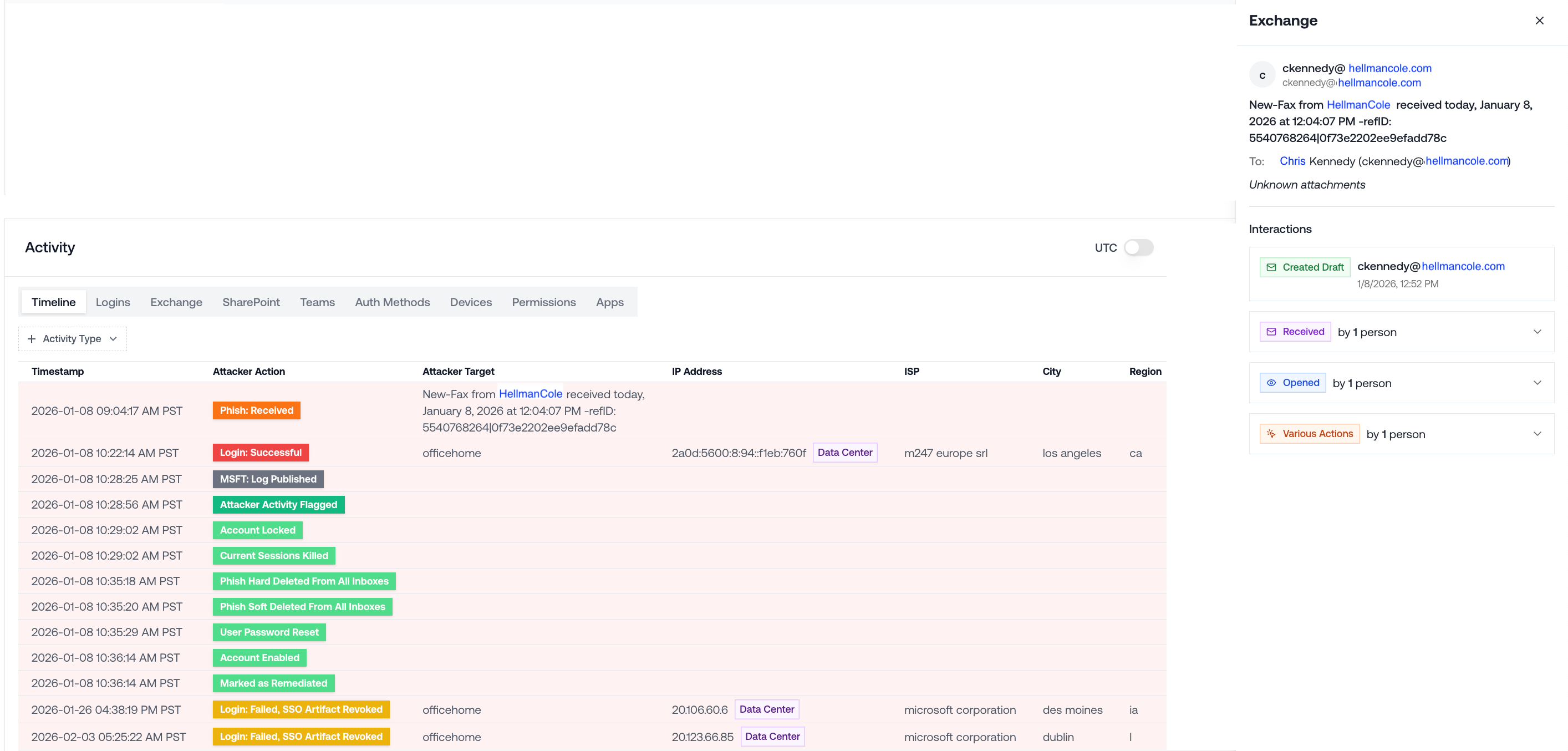
Let’s put ourselves in the user’s shoes:
The subject contains my company’s name, “Hellman Cole”. Looks like it was faxed a couple hours ago. It has a long reference ID. Seems automated.
This email came from me. Weird, I don’t remember sending this. Hmm, since it looks automated, maybe someone in the office sent it to me through the fax machine.
I guess the fax machine doesn’t have its own email address, so it just says it was sent from me.
Dang, it’s already been a few hours since they sent it, that timestamp means it’s gotta be urgent, right? Let me open it up.
Seconds later, the user is re-directed to a credential phishing page, and promptly compromised.
Case 2: The Fake Voicemail Notification
Subject line:
Caller left (52s VMSG) preview MSchneck-2b23948dce9298703ff0a3d96cd392ad
Sender:
mschneck@kx.org
Recipient:
mschneck@kx.org
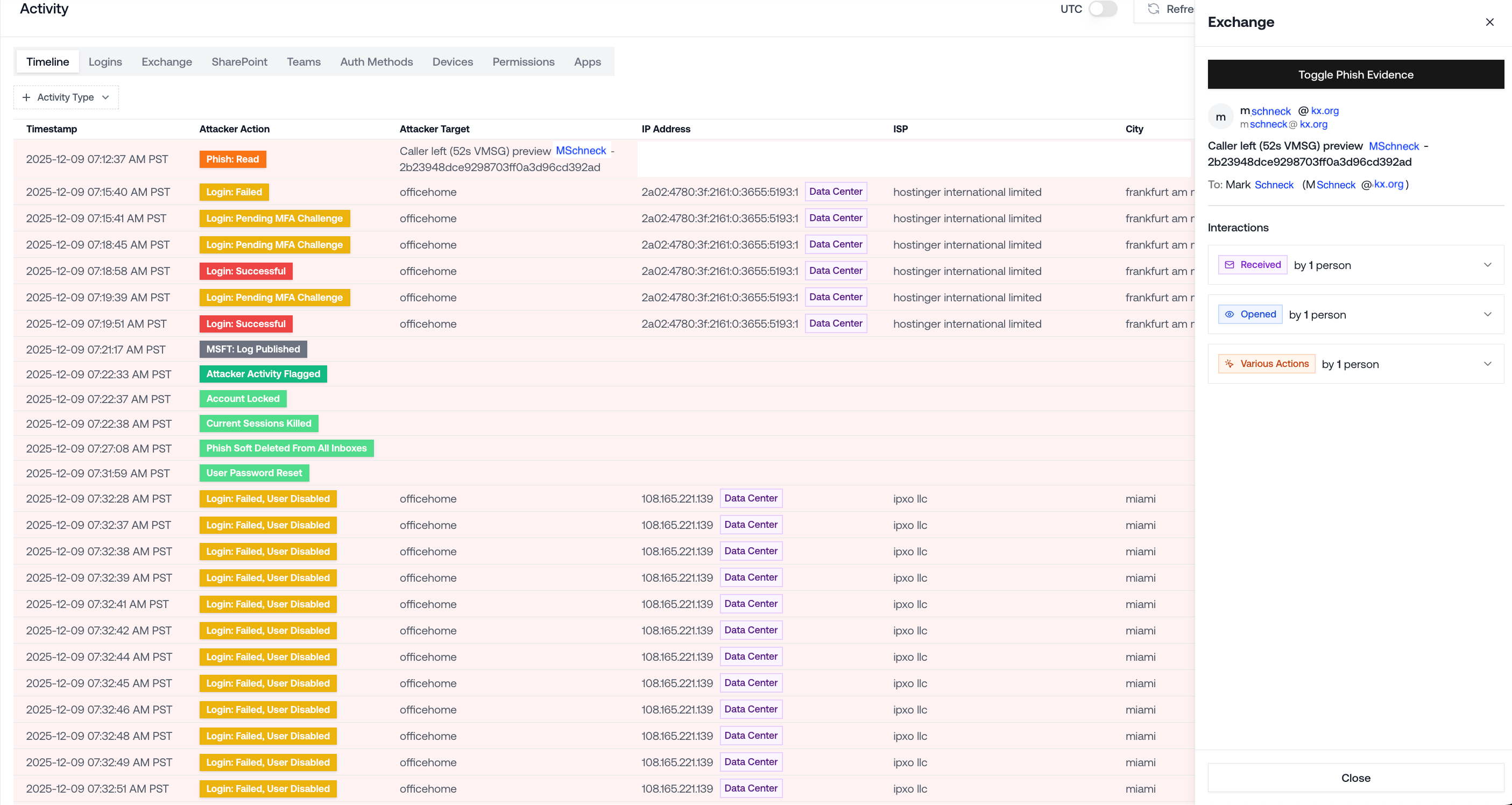
Once again, let’s imagine we’re the user:
Hmm, the email subject contains my name. Looks like someone’s leaving me a voicemail.
Kinda weird that this email came from me. Maybe the office phone has some auto-email notification setup for missed calls? It probably just means that the voicemail is meant for me.
It’s a voice message preview… I wonder what message they left me! Let me find out.
Sure enough, minutes later, the user’s credentials are stolen and their M365 account is compromised.
What Makes These Phishing Emails So Effective?
They look internal. The sender name and domain match the real user. They bypass email security completely.
They look automated. Fax machine. Voicemail system. Office infrastructure. The user can rationalize why the email appears to come from themselves: “It’s probably just how the system routes notifications”.
They look legitimate and urgent. They contain the company name and username. They have detailed timestamps and words like “preview”. The user is convinced they need to open the email ASAP to see the full contents of an important message.
How Is This Happening In the First Place?
Attackers are abusing Microsoft 365 Direct Send — a feature intended for printers and legacy apps that allows internal mail relay without authentication.
That means an external attacker can inject an email that:
Uses your domain
Spoofs a real user
Lands in inboxes despite failed authentication
This technique has been incorporated into phishing toolkits, so many of these campaigns are automated and built specifically for credential harvesting.
How To Respond To That Ticket
When you get one of these reports, the user probably isn’t compromised yet.
But, they’re definitely being targeted by attackers who are trying to steal their credentials.
Immediate Steps:
Review Entra sign-in logs. If you see anything suspicious, the user may have just been compromised, so revoke sessions and reset their password.
Work with the user to delete the email.
Advise them to be wary of other emails that appear to come from themselves. Those are phishing emails!
Environment-Level Hardening:
Determine whether the organization has any need for Direct Send.
If not, then enable “Reject Direct Send” via PowerShell:
Set-OrganizationConfig -RejectDirectSend $true
If Direct Send is needed in some cases, review mail flow configurations and constrain unauthenticated relay IPs to the minimum necessary footprint.
Takeaway: Attackers Exploit Weaknesses Quickly & At Scale
Microsoft environments are massive, high-value targets. That means any repeatable bypass will be weaponized quickly.
Once Direct Send abuse proved effective, phishing toolkits were quick to adopt it. As a result, Direct Send attacks have become widespread.
When it comes to defending Microsoft environments, the only constant is change: a new technique like Direct Send abuse can become mainstream in days, and adapting to novel attacker behavior is the name of the game.
If you want to trade notes, feel free to connect with me on LinkedIn. Always happy to share what we’re seeing across tenants at Petra.